
Echo Guide — Scalping
How to set up Echo automated trade execution for AlgoAlpha's scalping signals on Bybit, Binance, or Bitget.
Echo is AlgoAlpha's automated trade execution system. When configured for scalping signals, Echo receives each new signal the moment it is published and immediately places the corresponding trade on your exchange account -- including entry, take-profit, stop-loss, and position sizing.
Supported Exchanges
Echo supports the following exchanges for scalping signal automation:
| Exchange | Account Type | Margin Mode |
|---|---|---|
| Bybit | Unified Trading | USDT margined |
| Binance | Futures | USDT margined |
| Bitget | Futures | USDT margined |
Prerequisites
Before setting up Echo for scalping, make sure you have:
- An active VIP Bundle subscription (Echo is not available on the Signals Plan alone)
- A funded exchange account with at least $1,000 USDT recommended
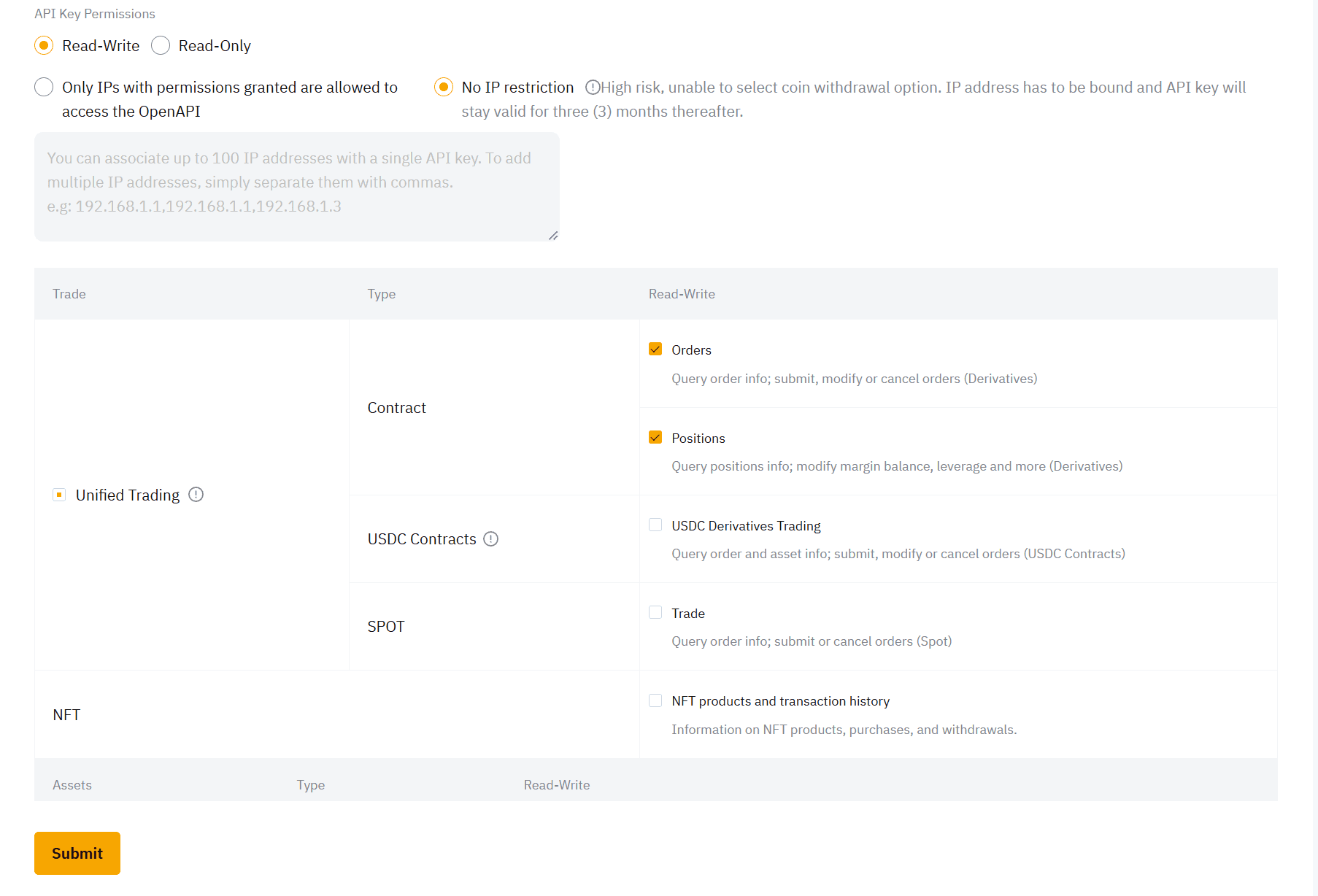
- API credentials from your exchange with trade-only permissions -- do not enable withdrawal access
Step-by-Step Setup
1. Generate API Keys on Your Exchange
Navigate to the API management section of your chosen exchange and create a new API key. When setting permissions:
- Enable: Futures trading / Contract trading
- Disable: Withdrawal, transfer, and any other non-trading permissions
Save your API key and secret securely. You will need both during Echo configuration.
2. Open the Echo Setup in Discord
In the AlgoAlpha Discord server, navigate to the Echo setup channel. You will see a configuration interface where you enter your exchange details.
3. Configure Your Connection
Enter the following details:
| Field | Value |
|---|---|
| Exchange | Select Bybit, Binance, or Bitget |
| API Key | Paste your exchange API key |
| API Secret | Paste your exchange API secret |
| Stablecoin | USDT |
| Order Type | Market (recommended) or Limit |
4. Set Risk Parameters
Configure how much capital Echo should allocate per trade:
- Risk per trade -- the percentage of your account to risk on each signal
- Maximum position size -- an upper cap on any single trade
Start conservatively and adjust after observing performance over several signals.
5. Activate Echo
After confirming your settings, activate Echo. The system will verify your API connection and display a status indicator:
- Green / Active -- Echo is connected and will execute incoming signals
- Red / Inactive -- there is a connection issue (see Echo Debugging)
How Echo Executes Scalping Signals
When a new scalping signal is published:
- The algorithm generates the signal with entry, TP, and SL levels
- Echo receives the signal immediately via internal API
- Echo places the trade on your exchange with your configured position sizing
- The TP and SL orders are set automatically
- You receive a notification that the trade has been opened
The entire process happens within seconds of signal publication.
Important Guidelines
- Dedicated account only -- do not place manual trades on the same account Echo uses. Manual positions may interfere with automated entries and exits.
- No withdrawal access -- Echo operates with trade-only API permissions. It cannot move funds out of your account.
- Monitor periodically -- while Echo runs autonomously, check your positions and account status regularly to ensure everything is functioning correctly.
- Exchange maintenance -- during exchange downtime or maintenance windows, Echo cannot place trades. Signals published during these periods may be missed.
Troubleshooting
If Echo is not executing trades as expected, refer to the Echo Debugging Guide for common issues and solutions.