
Screener
How to use the Momentum Concepts multi-asset screener to monitor oscillator readings across up to 18 tickers.
The Momentum Concepts Screener is a built-in dashboard that monitors momentum conditions across up to 18 assets from a single TradingView chart. It displays oscillator readings, trend states, and signal events in a compact table overlay — helping you identify trade opportunities without manually switching between charts.
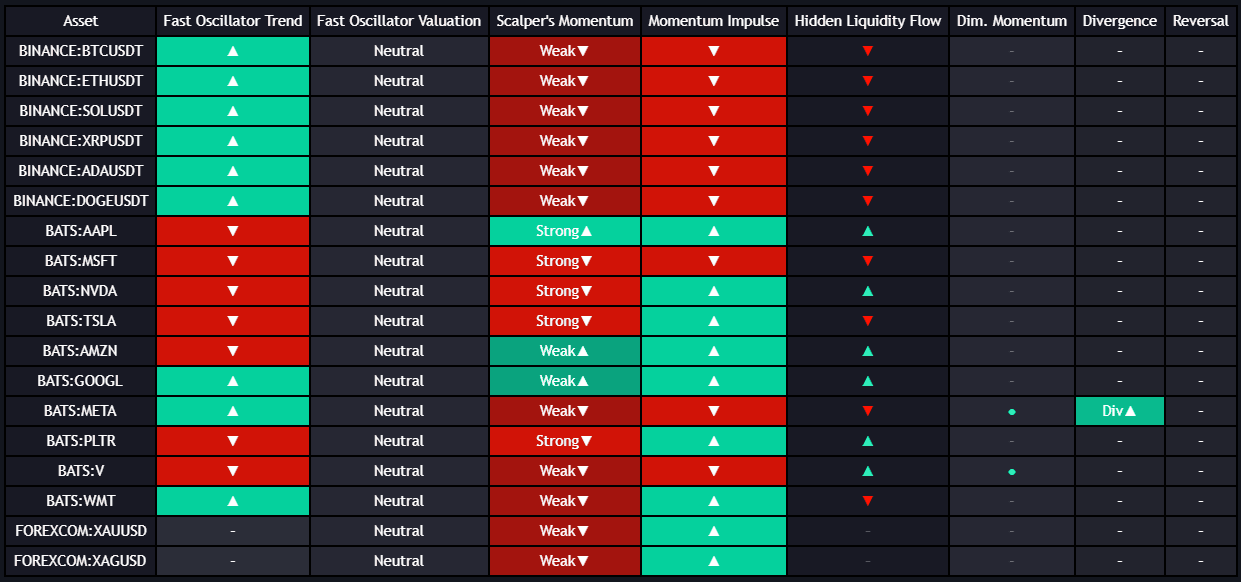
What the Screener Shows
The screener displays a row for each monitored ticker with the following information:
| Column | Description |
|---|---|
| Ticker | The symbol being monitored |
| Oscillator Value | The current reading of the selected oscillator for that asset |
| Momentum State | Whether momentum is bullish, bearish, or neutral based on the selected oscillator |
| Signal | Whether a fresh signal (reversal, cross, or divergence) has occurred within the recent lookback window |
| Trend | A color-coded indicator of the asset's current momentum direction |
Oscillator Views
The screener can display data from any of the four Momentum Concepts oscillators. Switch between views using the Screener View setting:
| View | Best For |
|---|---|
| Fast Oscillator | Scanning for short-term reversal and entry opportunities |
| Momentum Impulse | Identifying which assets are in trending vs. consolidating regimes |
| Scalper's Momentum | Finding intraday scalping setups across multiple assets |
| Hidden Liquidity Flow | Determining which assets have institutional buying or selling activity |
Setting Up the Screener
- Open the Momentum Concepts settings on your chart
- Navigate to the Screener section
- Toggle Show Screener to On
- Enter up to 18 ticker symbols
- Select the oscillator view you want to display
- The screener table will appear on your chart
The screener analyzes all tickers on the same timeframe as your current chart. To monitor 4-hour momentum readings, set your chart to the 4-hour timeframe.
Example Watchlist Configurations
Crypto Momentum Scanner
Monitor the top crypto assets for momentum shifts:
BINANCE:BTCUSDT, BINANCE:ETHUSDT, BINANCE:SOLUSDT, BINANCE:BNBUSDT,
BINANCE:XRPUSDT, BINANCE:ADAUSDT, BINANCE:DOGEUSDT, BINANCE:AVAXUSDT,
BINANCE:DOTUSDT, BINANCE:LINKUSDT, BINANCE:MATICUSDT, BINANCE:ATOMUSDT
Forex Majors
FX:EURUSD, FX:GBPUSD, FX:USDJPY, FX:AUDUSD,
FX:USDCAD, FX:NZDUSD, FX:USDCHF, FX:GBPJPY
US Large Caps
NASDAQ:AAPL, NASDAQ:MSFT, NASDAQ:NVDA, NASDAQ:AMZN,
NASDAQ:GOOGL, NASDAQ:META, NASDAQ:TSLA, NYSE:JPM
Using the Screener Effectively
Scanning for Aligned Momentum
Look for tickers where the oscillator value and trend direction are both strongly aligned:
- A ticker showing a strong positive oscillator value with a bullish trend label is in strong bullish momentum
- A ticker showing a strong negative value with a bearish label is in strong bearish momentum
- These aligned tickers are the best candidates for directional trades
Spotting Divergences Across Assets
When most assets in a sector show bullish momentum but one or two are diverging, it may indicate an opportunity:
- The diverging asset could be lagging and about to catch up (trade in the sector direction)
- Or it could be leading a broader reversal (watch for confirmation)
Rotating Between Views
Check multiple oscillator views to build a complete picture:
- Start with Hidden Liquidity Flow to identify which assets have institutional backing
- Switch to Momentum Impulse to see which of those assets are in trending conditions
- Switch to Fast Oscillator to find entry timing opportunities among the trending assets
Limitations
- Maximum 18 tickers per screener instance
- All tickers share the same timeframe and oscillator view
- Data updates on bar close, not tick-by-tick
- Running the full 18-ticker screener increases computational load on your TradingView session