
Liquidation Heatmap
How the ILPAC Liquidation Heatmap visualizes leveraged order clusters and probable liquidation zones.
The Liquidation Heatmap is one of ILPAC's most distinctive features. It visualizes price levels where leveraged positions are likely to be liquidated, revealing hidden clusters of forced buy and sell orders that can act as powerful magnets for price movement.
What Is a Liquidation Zone?
When traders use leverage, their exchange sets a liquidation price — the level at which the position is automatically closed to prevent further losses. When many leveraged positions have liquidation prices near the same level, a liquidation zone forms. If price reaches that zone, a cascade of forced closures can create rapid, aggressive price moves.
Institutional and algorithmic traders often target these zones intentionally, pushing price toward areas of concentrated liquidations to absorb the resulting liquidity.
How the Heatmap Works
ILPAC estimates probable liquidation levels by analyzing historical price data and modeling where leveraged positions are likely concentrated based on:
- Recent price action and volatility patterns
- Common leverage ratios used in the market
- Distance from key swing points where traders typically enter positions
The heatmap renders as a color gradient overlay on your chart:
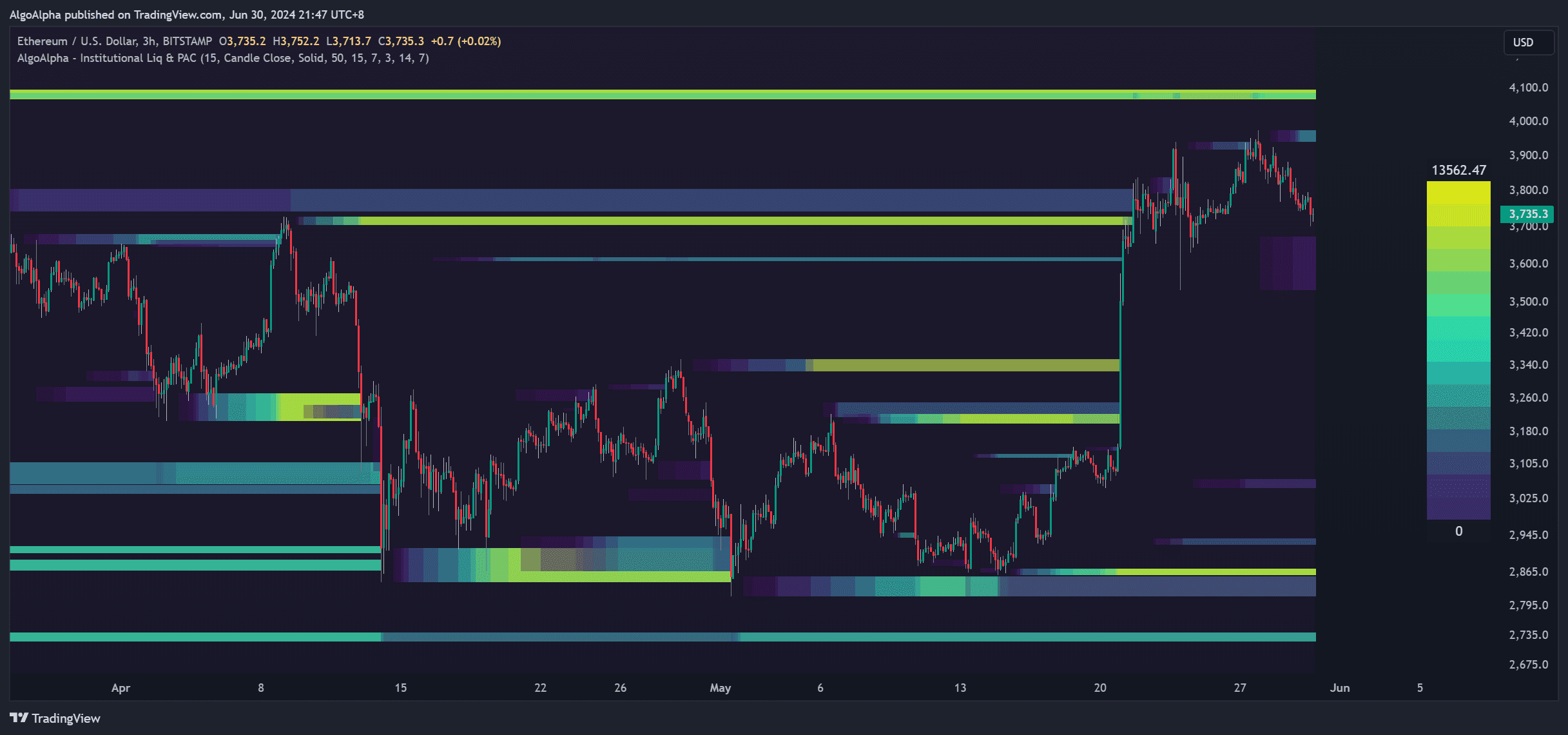
| Color Intensity | Meaning |
|---|---|
| Bright / Hot colors | High concentration of estimated liquidations — strong liquidity zone |
| Dim / Cool colors | Low concentration — less significant liquidity |
| No color | Minimal estimated liquidation activity at that level |
Reading the Heatmap
The heatmap is displayed along the price axis, typically appearing as bands above and below the current price:
- Zones above price: Areas where short-position liquidations are concentrated. If price moves up to these levels, short sellers face forced closures (buying pressure)
- Zones below price: Areas where long-position liquidations are concentrated. If price moves down to these levels, long holders face forced closures (selling pressure)
Trading with the Heatmap
As Dynamic Support and Resistance
High-concentration liquidation zones frequently act as support or resistance. Price often pauses, reverses, or accelerates when it enters a dense liquidation band. You can treat bright zones as areas of likely price reaction.
Liquidity Grab Entries
A common institutional pattern is the "liquidity grab" — price briefly pierces into a liquidation zone, triggers a cascade of forced orders, then reverses sharply. Watching for this behavior near bright heatmap zones can help time entries:
- Identify a bright liquidation zone near current price
- Wait for price to wick into the zone
- Look for a reversal signal (such as a CHoCH or FOMO Bubble) at or near the zone
- Enter in the reversal direction with a stop-loss beyond the zone
Target Setting
Dense liquidation zones ahead of your position can serve as take-profit targets. Price is often drawn to these areas, and the resulting volatility when liquidations trigger makes them natural exit points.
The Liquidation Heatmap is most effective on crypto and futures markets where leveraged trading is prevalent. It still provides useful volatility-based insights on equities and forex, but the liquidation logic is most directly applicable to leveraged instruments.
Settings
| Setting | Description |
|---|---|
| Show Heatmap | Toggle the liquidation heatmap on or off |
| Lookback Period | Number of bars used to calculate the heatmap — shorter periods highlight recent activity, longer periods show major historical zones |
| Color Scheme | Choose from predefined color gradients or customize individual colors |
| Opacity | Adjust overall heatmap transparency to balance visibility with chart readability |
| Resolution | Controls the granularity of the heatmap bands — higher resolution shows more detail |
See the Settings Reference for a complete list of configurable options.