
Trend Lines
How ILPAC automatically draws and validates support and resistance trendlines using an algorithmic approach.
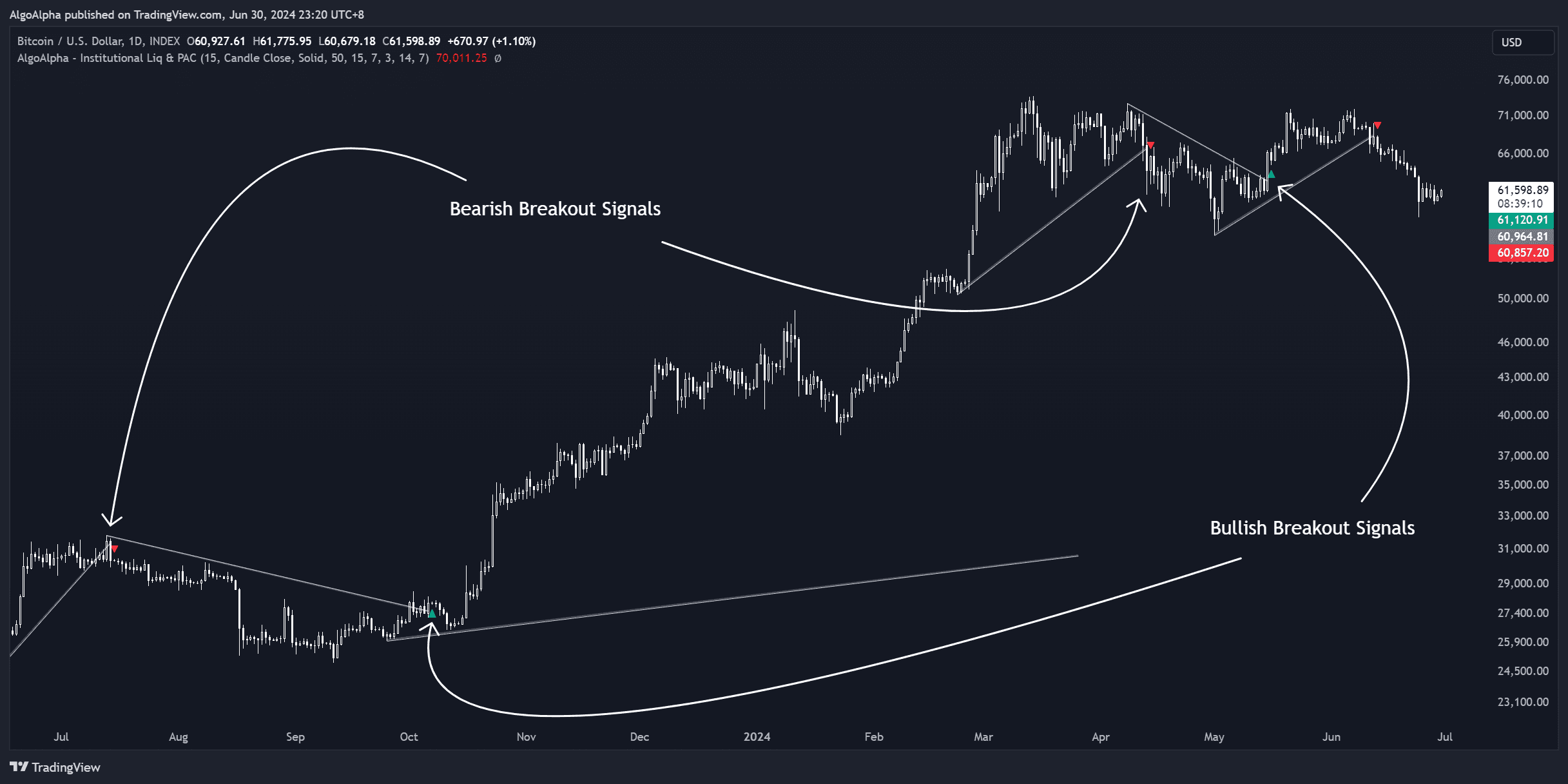
The Trend Lines module in ILPAC removes one of the most subjective aspects of technical analysis — manually drawing trendlines. It algorithmically identifies significant swing points and connects them to form validated support and resistance trendlines, updating them in real time as new price data arrives.
How Algorithmic Trendlines Work
Traditional trendline drawing is subjective: two traders looking at the same chart will often draw different lines depending on which swing points they choose and how they interpret wick vs. body touches. ILPAC eliminates this variability by using a consistent set of rules:
- Swing identification: The algorithm identifies confirmed swing highs and lows using the same pivot detection engine as the Market Structure module
- Line construction: Trendlines are drawn by connecting two or more swing points of the same type (e.g., connecting ascending swing lows for a bullish trendline)
- Validation: Lines are validated based on the number of touches, recency, and slope characteristics
- Break detection: When price closes beyond a validated trendline, ILPAC flags a trendline break event
Types of Trendlines
| Type | Description |
|---|---|
| Ascending support | Connects a series of higher swing lows — represents an uptrend floor |
| Descending resistance | Connects a series of lower swing highs — represents a downtrend ceiling |
| Horizontal | Connects swing points at approximately the same price level — represents a flat support or resistance zone |
Trendline Breaks
A trendline break occurs when price closes beyond the trendline, not just wicks through it. ILPAC distinguishes between temporary pierces and confirmed breaks:
- Wick through: Price touches beyond the trendline intra-bar but closes back inside — not considered a break
- Close beyond: Price closes a full candle body beyond the trendline — flagged as a trendline break
Trendline breaks can be used as trade signals on their own or as confirmation alongside other ILPAC events (like BOS or CHoCH).
Trading with Algorithmic Trendlines
Trendline Bounces
When price approaches a validated ascending trendline during an uptrend, the trendline acts as dynamic support. Traders often look for long entries at or near the trendline, placing stops below it.
Break-and-Retest Entries
After a trendline breaks, price frequently retests the broken line from the other side. A broken ascending support trendline may become resistance on the retest. This pattern offers defined risk entries:
- Trendline breaks with a confirmed close
- Price pulls back to retest the broken trendline
- Rejection at the retest level confirms the break
- Enter in the break direction with a stop on the other side of the trendline
Confluence with Market Structure
Trendline breaks that coincide with BOS or CHoCH events carry more weight. For example, a bearish CHoCH that also breaks an ascending trendline provides a strong case for a trend reversal.
Trendlines work best on higher timeframes (1-hour and above) where swing points are more meaningful. On very low timeframes, you may see more frequent but less reliable trendline formations.
Settings
| Setting | Description |
|---|---|
| Show Trend Lines | Toggle automated trendlines on or off |
| Minimum Touches | Minimum number of swing point contacts required to validate a trendline |
| Line Extension | How far trendlines extend to the right beyond the last confirmed touch |
| Break Detection | Enable or disable trendline break alerts and labels |
| Line Style | Customize line color, width, and dash pattern |
See the Settings Reference for all options.